
Your booking tells you which workflow applies. The project brief and producer direction take precedence over anything on this page.
Delivering headshots or social-media selects? Use the dedicated guides: Delivery of headshot assets and Delivering social media selects.
Required for every delivery
01 · Shoot-only projects
No editing booked? Send the raw files to your producer
02 · Basic editing workflow
Import, tag, cull, and pick your best
For projects that include basic editing, work through these steps in Lightroom before you export.
Your Name | Orange Photography
03 · Export settings and file naming
Export every edited image the same way
| Setting | Value |
|---|---|
| Format | JPG |
| Quality | 92% |
| Resolution | 72 dpi |
| Resize | Long edge, 4500 px |
| Output sharpening | Screen |
Rename every exported file using this convention. You’ll find the Job ID in your “You’ve been booked” email.
JobID_Initials_Sequence.jpg
04 · Delivering your files
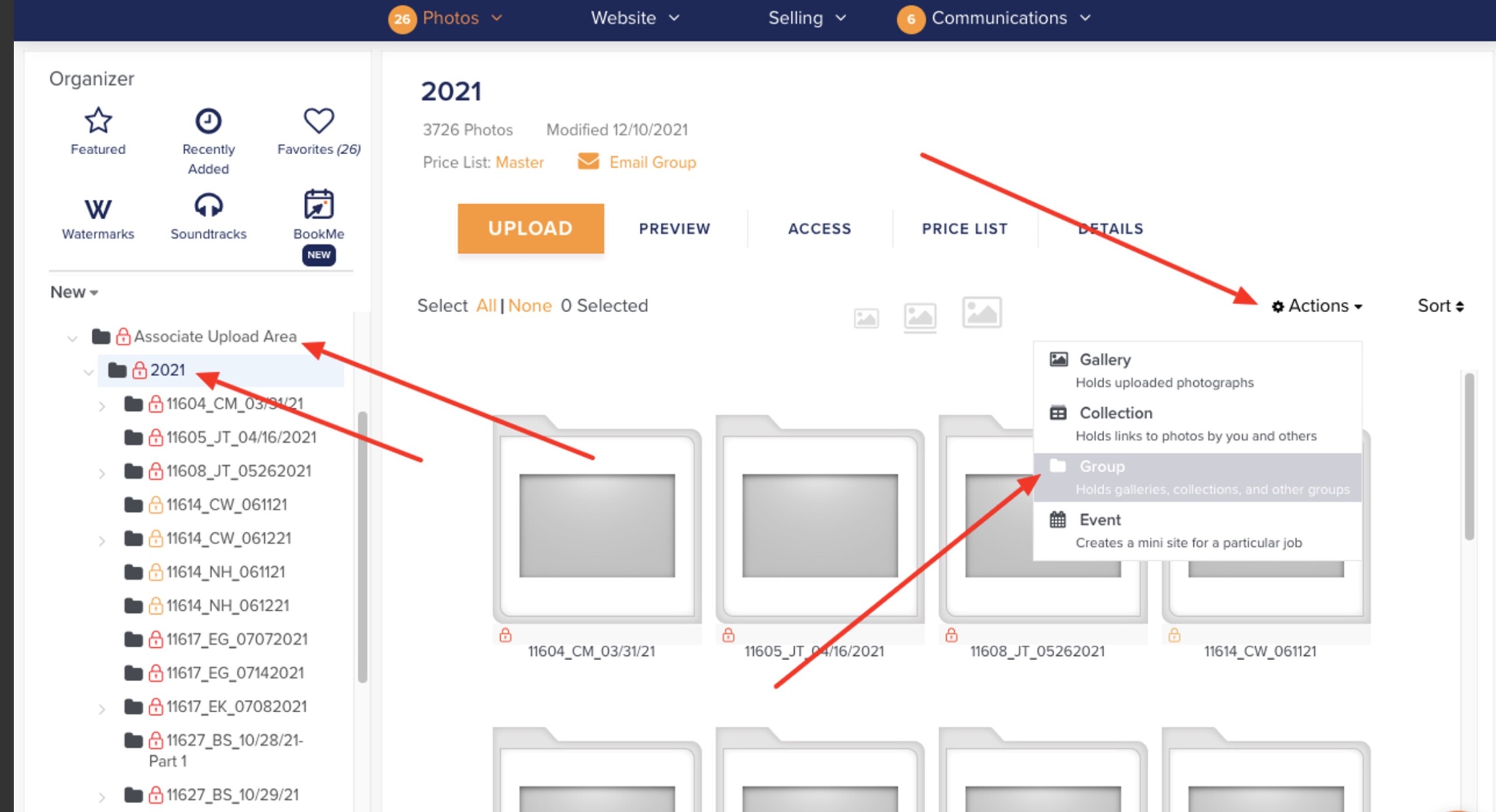
Upload to Zenfolio, labeled so we know it’s complete
Include the number of images in every gallery name so we can confirm the upload is complete.
Upload steps
05 · Delivery checklist